IBM Server Site

IBS Home Up

RP 12 - Update files after statements

What does this option do?

  • This option deletes all paid invoices and payments from the customer account.
  • This option updates all aging
    • new items are flagged as current
    • current items are flagged as 30 days past
    • 30 days past items are flagged as 60 days past, etc.

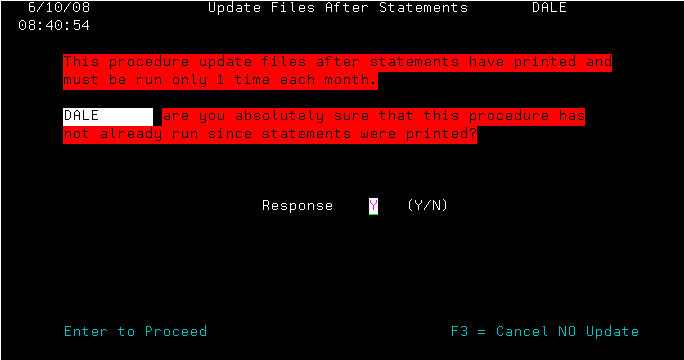
How do I know that this hasn't been run?

  • Check any account that has had new items on the last statement run.

    If the prior sales to last statement run are flagged as 'New' = it has not been run.

    If the sales are flagged as 'Current', then it has been run before.

Screen 1 - Verification screen

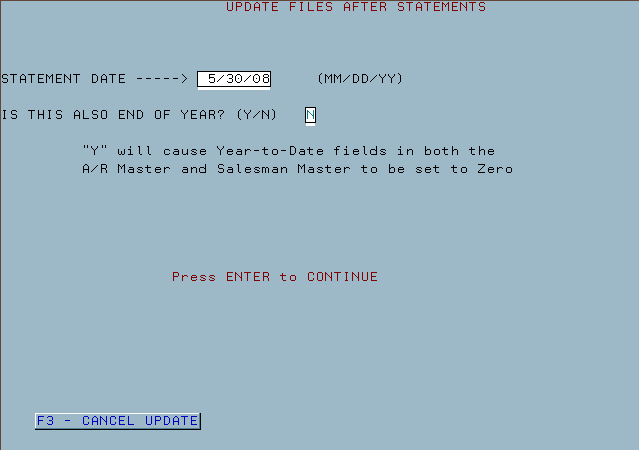
Screen 2 - Statement date, Year End

IBS Lumber and Building Material Software Copyright © 2006 IBS Lumber Software Inc (TM)
Last modified: November 7, 2011

IBS Sales & Support 888-640-1252
Main Office 888-640-1252
Fax IBS 877-712-8937

All pages contained in this support website are not intended for general public distribution. Any material here can be considered private, confidential with various copyrights and restrictions against public release. You 'the browser' cannot legally release this information for general public distribution.

remote support: http://www.gotomeeting.com | remote support download program