IBM Server Site

IBS Home Up Problems & Errors Noting the differences

GR 2, Trial Balance

[back to top]

*IMPORTANT

Your GL Trial Balance pulls from two places.

  • Your financial format member (usually a balance sheet or income statement) GU 21,6 or GU 15,3
  • Closed periods GU 14, 2 (Period close)

YOUR TRIAL BALANCE WILL NOT

  • display changes made in an open period
  • display any accounts not in the financial format member!

[back to top]

Running the Report | Report Will Not Run

Running the Trial Balance Report

  • Stop, before continuing: have you closed all periods?
    • Go to GU 14, 2 and close the current period.
    • If the message appears that earlier periods are still open then close them first!
  • From the main Applications menu key "GR" (General Ledger Reports). The trial balance report select screen will prompt
  • Key in the start and end periods then press ENTER.
    Please note that if you want a trial balance for a single month you must key the same start and end month and year
  • Finally, press ENTER to confirm report or F12 to cancel

[top]


Problems

Trial Balance Will Not Run

  • I can't run my trial balance report and the following message displays:

    This message appears whenever one of the following occurs:

    • The fiscal year has not been started
    • The date range is in the future
    • There is no data during that period to calculate a trial balance.

[top]

Sample Reports

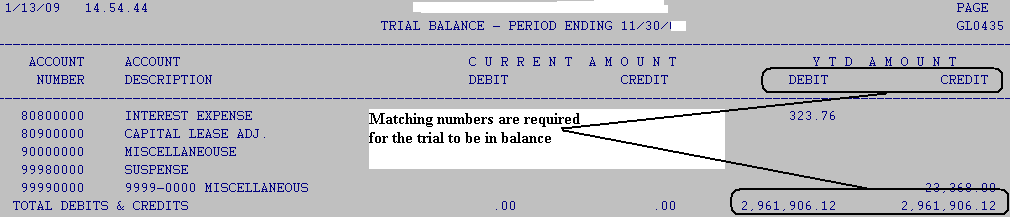
In balance Example

[back to top]

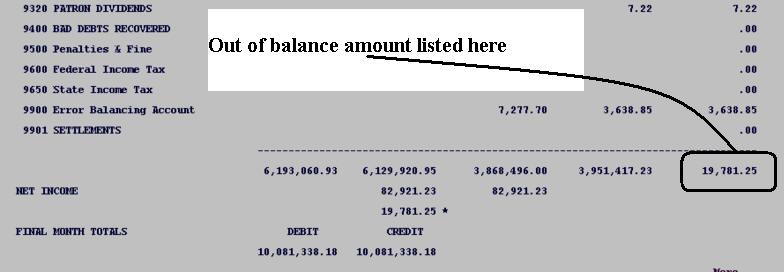
Out of Balance Example

  • If your period is out of balance please run the detailed transaction report (GR 12) for the required period. Then start looking for any account that is out of balance.
[back to top]

IBS Lumber and Building Material Software Copyright © 2006 IBS Lumber Software Inc (TM)
Last modified: November 7, 2011

IBS Sales & Support 888-640-1252
Main Office 888-640-1252
Fax IBS 877-712-8937

All pages contained in this support website are not intended for general public distribution. Any material here can be considered private, confidential with various copyrights and restrictions against public release. You 'the browser' cannot legally release this information for general public distribution.

remote support: http://www.gotomeeting.com | remote support download program