IBM Server Site

IBS Home Up

GR 5 - Format File Listing

Field listing

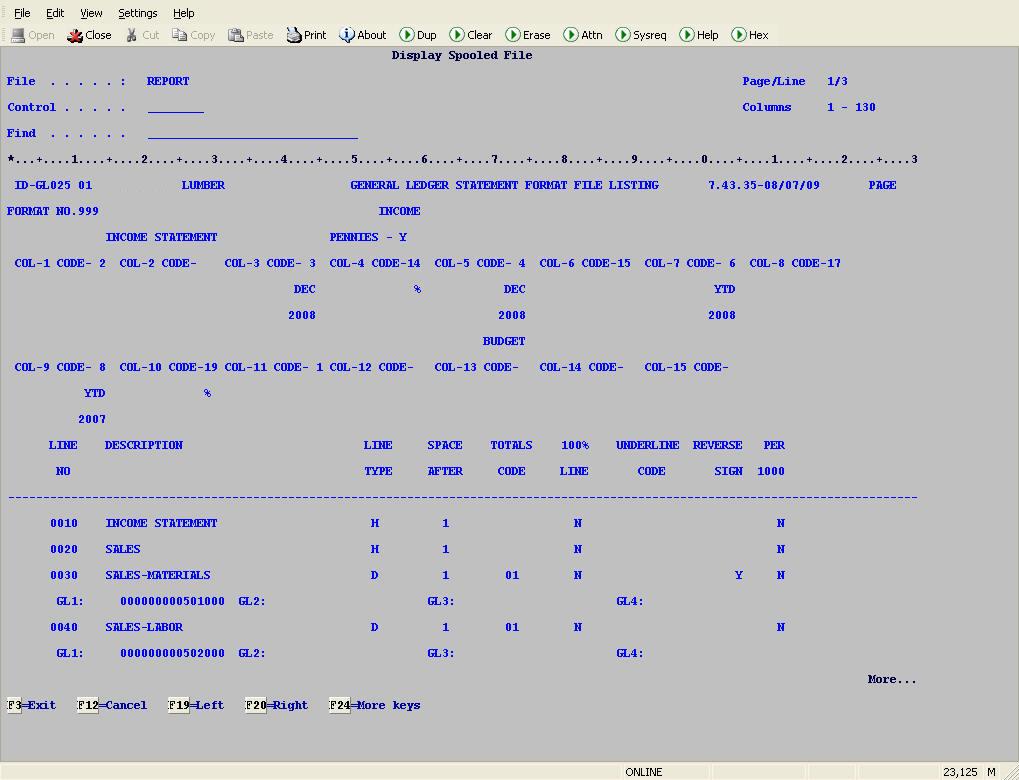
Line Type

  • D = Detail line
  • H = Header line (use to start a new column)
  • S = Subtotal line (use to total all detail lines since the last subtotal)
  • T = Total line (use to total all the subtotals)

Space After

  • usually 1 or 2 (use to arrange column spacing)

Totals Code

  • Use to tag a detail item for a specific subtotal.
    For example: all the code 02 detail items will sub-total under the code 02 subtotal, all the code 12 detail items will sub-total under the code 12 subtotal, etc.

100% Line

  • Y =
  • N =

Underline Code

  • Y = underline total
  • N = don't underline

Reverse Sign

  • Y = show in brackets
  • N = standard $$$

Per 1000

  • Y = show in 1000s
  • N = show in $$$

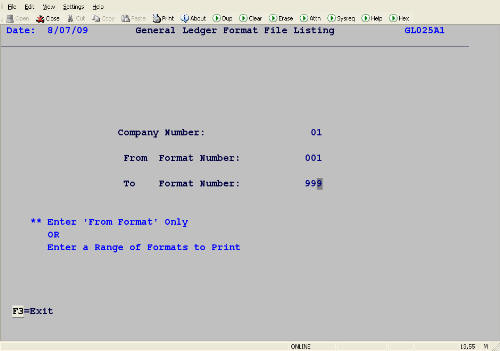
Screen 1 - Select format member(s)

  • Key in the member number(s) that you want to print.
    • for all members use 001 to 999
    • for a single member use the same number in the from and to fields.

GR 5 Screen 1

Example of a printed format member

IBS Lumber and Building Material Software Copyright © 2006 IBS Lumber Software Inc (TM)
Last modified: November 7, 2011

IBS Sales & Support 888-640-1252
Main Office 888-640-1252
Fax IBS 877-712-8937

All pages contained in this support website are not intended for general public distribution. Any material here can be considered private, confidential with various copyrights and restrictions against public release. You 'the browser' cannot legally release this information for general public distribution.

remote support: http://www.gotomeeting.com | remote support download program