GI 5 - Listing of IBS Account Posts
Overview
What does this option do?
This option provides a quick reference to what has been posted into the
general ledger from your daily invoice register (i.e. sales, inventory and
receivables).
When should I take this option?
Select this option whenever you need a quick chart of accounts listing either
for a number or account name.
What fields are displayed
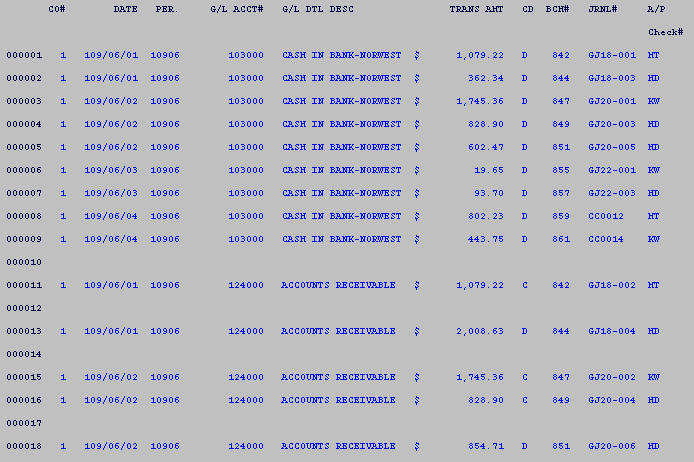
- Company - the company number is displayed.
- Period - The period is
displayed
- Transaction Date - the date this was created is displayed.
- GL Account Number - the account number is displayed.
- Detailed description - the detailed description is displayed.
- Transaction amount - the transaction amount is displayed.
- Code - D = Debit or C = Credit transaction code is displayed
- Batch #
- the assigned batch number is displayed.
- Journal #
- the assigned journal reference number is displayed.
- A/P Check #
- the person running the invoice number or check number is
displayed.
Examples
Example of IBS Post Listing
- Chart listing is by period then account number.
| 



