IBM Server Site

IBS Home Up Device Addresses Decision Data I-O Terminals IBM Infowindows Priam 5488 Keyboard Differences Non-Supported Schematic

Twinax Terminals

See Also

Quick Twinax Troubleshooting Guide

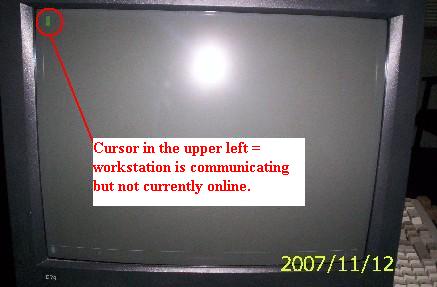
Cursor location
Upper left | Upper right |
Bounces between the two sides | Screen is completely blank

Power & Settings issues
Restarts regularly | Loses settings |
Continually beeps

Reset workstations and printers
Workstations without printers | Workstations with printers | Workstations with printers connected to IO Terminals

[back to top]

[back to top]

  • Screen is completely blank with no cursor
    • Check the power to the monitor.
      • is the monitor turned on?
      • is the monitor power cable connected?
      • is the outlet to the monitor working?
      • is the cable from the monitor to the terminal connected

[back to top]

How to reset a terminal or PC not physically connected to a printer

  1. sign off the terminal
  2. turn the terminal off
  3. turn the terminal on
  4. If the screen goes to a sign-on your done. If the screen doesn't go to a sign-on check the location of the cursor (see above)

[back to top]

How to Reset a Printer connected to a PC or Terminal (except for I-O Workstations)

  1. turn the printer off
  2. turn the terminal off (or session off)
  3. turn the printer on
  4. turn the terminal on (or activate the session)
  5. test the printer

[back to top]

How to Reset a Printer connected to an I-O Terminal

  1. turn the printer off
  2. turn the terminal off
  3. turn the terminal on
  4. turn the printer on
  5. test the printer

[back to top]

IBS Lumber and Building Material Software Copyright © 2006 IBS Lumber Software Inc (TM)
Last modified: November 7, 2011

IBS Sales & Support 888-640-1252
Main Office 888-640-1252
Fax IBS 877-712-8937

All pages contained in this support website are not intended for general public distribution. Any material here can be considered private, confidential with various copyrights and restrictions against public release. You 'the browser' cannot legally release this information for general public distribution.

remote support: http://www.gotomeeting.com | remote support download program