| London, United
Kingdom - 19 September 2005
- Linksys®, a Division of Cisco Systems, Inc., the recognised
leading provider of voice, wireless and networking hardware for
the consumer, SOHO (Small Office/Home Office) and small business
customer, is now offering a VPN client configuration software
package called QuickVPN, (QVPN50) which works with Windows 2000
or XP server software and the Linksys Wireless-G VPN Router
(WRV54G).QuickVPN is a configuration software tool which
simplifies the setup of encrypted VPN connections for IT
administrators and employees. The first five licenses of
QuickVPN are included in the price of the Linksys WRV54G router
and a total of 50 additional licenses can be purchased
separately.In comparison with other VPN Client solutions,
Linksys QuickVPN software offers a setup tool which simplifies
the connection of employees to their network whilst on the road
or working from remote offices. Quick VPN has been designed to
work seamlessly with Windows 2000 and XP VPN client software and
the Linksys Wireless-G VPN router, so setup and use can be quick
and simple. 3 Simple
Steps each for the IT administrator and employee:
Typical Network Administrators Steps:
- Verify the Linksys VPN router
firmware is at a current revision level which supports the
QuickVPN server software.
- Access the QuickVPN server
configuration tab and create a user name and password for
each employee.
- Click on the VPN client list and
activate the employee. Users can also edit, or remove
employees from this list.
Typical Employee Steps:
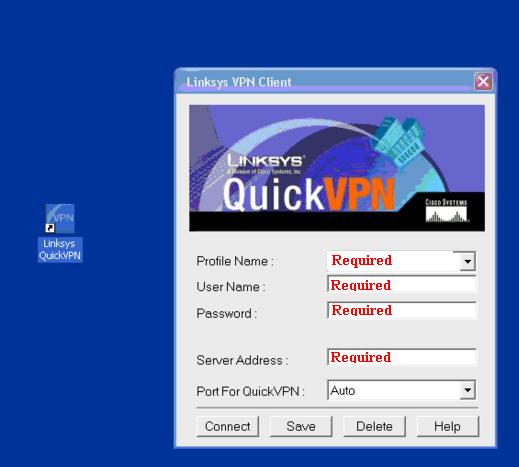
- Load the Linksys QuickVPN client
software on a computer running Windows 2000 or XP.
- Create a profile by entering a user
name, password and the Linksys VPN router's IP Address
(given to the employee by the company network
administrator).
- Save the profile for future use,
then select Connect.
After the employee does the above steps,
the username and password are automatically sent to the VPN
router back at the office and verified against the authorised
list in the router. If approved, the VPN information (Domain
name, pre-shared keys, etc.) is exchanged between the client and
server and the VPN tunnel is initialised. Users are then
communicating using a security-enable VPN tunnel.
Products Currently Compatible with QuickVPN (all available
with 5 licences loaded on the router, 50 user packages)
- Wireless-G VPN Router (WRV54G)
- 4-port VPN Router (RV042)
- 8-port VPN Router (RV082)
About Linksys
Founded in 1988, Linksys, a Division of Cisco Systems, Inc.
(NASDAQ: CSCO) is the recognized leader in Voice, Wireless and
Ethernet networking hardware for consumer, SOHO and small
business users. Linksys is dedicated to making networking easy
and affordable for its customers, offering innovative,
award-winning products that seamlessly integrate with a variety
of devices and applications. Linksys provides award-winning
product support to its customers. For more information, visit
www.linksys.com/uk
# # #
Linksys is a registered trademark or trademark
of Cisco Systems, Inc. and/or its affiliates in the U.S. and
certain other countries. Copyright © 2005 Cisco Systems, Inc.
All rights reserved.
|