General Mochasoft Information
Mocha W32 TN5250
Mocha W32 TN5250 is a Windows 95/98/2000/NT/XP application. It makes it possible
to connect to an IBM host (AS/400) via TCP/IP with the TN5250 protocol and
emulate a 5250 Display Station.
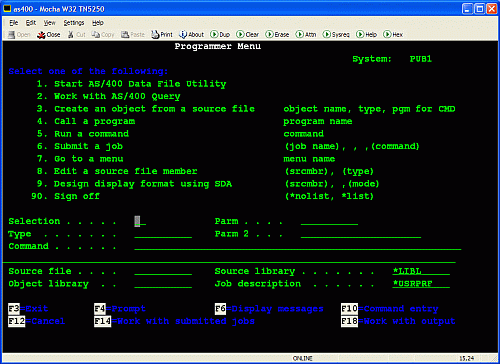
Mocha W32 TN5250 Features:
- Supports all standard 5250 emulation features
- Alternate screen size (24x80 or 27x132)
- SSL (Secure Socket Layer) (see below)
- Small and fast. The package is only 231 K
- User defined functions keys
- German and Danish menu/dialog text option + possible to make your own
language version
- Support for Euro
- Mouse wheel support (page up/down)
- Device name support
- Hotspots (Fx and Fxx text on the 5250 screen can be used as buttons)
- Last Transaction Time Indicator
- Hardcopy of screen
- Mail support
- Proxy login
- Keyboard macro support
- Possible to configure the toolbar
- Many trim parameters
- Online Help
- Installation/Uninstallation programs
- Free upgrades to new versions of the product
- Low cost : Single User license 25 USD or 250 USD for a Company License.
Download Mocha W32 TN5250
Information about the SSL option
With the Secure Sockets Layer (SSL) protocol, it is possible to establish a
secure connection between the AS/400 and a Telnet client.
Mocha W32 TN5250 Version 5.0 includes support for the SSL protocol.
Limitations in Mocha W32 TN5250 SSL:
Only support for 56 and 128 bit key length.
No validation of the Certificate from the AS/400. A Certificate is used for
the AS/400 to proving its identity. We have selected not to include such an
option, as to keep the use of SSL as simple as possible. For most customers the
main reason to select the SSL protocol, is to make the data traffic secure.
IBM AS/400 Information
Center includes a number of publications about SSL issues. Make a search for
telnet ssl
or try
i400 Technical Studio (TCP Reference) and select Select Trouble shooting
SSL-enabled Telnet server
This Web page includes a summary of how to build an AS/400 system with SSL
support. We assume you will NOT use an external Certificate Authority, but
generate local digital certificates for your system.
Digital Certificates are used to verify the TN5250 User is in contact with the
correct AS/400. In most SSL installations, this is not a big issue. The reason
for using SSL, is to create a secure encrypted session, meaning it is not
possible with a net sniffer to see password or user data.
1. Install following AS/400 software programs on the AS/400 (V4R4)
Digital Certificate Manager (DCM), option 34 of OS/400 (5769-SS1)
TCP/IP Connectivity Utilities for AS/400 (5769-TC1)
IBM HTTP Server for AS/400 (5769-DG1)
One of the IBM Cryptographic Access Provider products: 5769-AC2 (56-bit), or
5769-AC3 (128-bit). Notice AS/400 Model 150 uses products 5649-AC5 and 5649-AC6
2. Configure the Digital Certificate Manager
2.1 Start the HTTP Server on the AS/400 as an ADMIN instance.
Issue following AS/400 commands:
GO TCPADM
5. Start TCP/IP servers
Server application *HTTP
Server instance *ADMIN
2.2 Start a Web browser as Internet Explorer 4.0/5.0/6.0 on a PC.
Select URL http://your_system_name:2001
A screen with 2 major options will be displayed. Select Digital Certificate
Manager
A new screen with a menu is displayed. Select Certificate Authority (CA)
Select Create a Certificate Authority, and fill out the form. In our test case,
we selected key length 512.
We must now assign the new certificate to the Telnet Server.
Go back to the main menu, and select System Certificates. Select work with
secure applications
Click the button next to the application QIBM_QTV_TELNET_SERVER.
Select Work with system certificate
Select the Certificate to use.
Click Assign new certificate.
Verify a Yes is displayed next to QIBM_QTV_TELNET_SERVER. If it says No, there
is something wrong.
3.0 Start Telnet Server on the AS/400.
At an AS/400 prompt write:
STRTCPSVR *TELNET
4.0 Verify the Telnet Server is ready for a SSL session
At an AS/400 prompt write:
NETSTAT *CNN
If the Telnet server is ready, a local port with the text telnet- should be
displayed. Actually the port text is telnet-ssl, but it is a harmless bug on the
AS/400.
5.0 Start Mocha W32 TN5250
If Netstat displayed the correct informations, start mocha w32 tn5250, and
select menu - file - connect - advanced -
Enable the SSL option.
Press Ok , Ok, and if the SSL session works correct, the status line in mocha
w32 tn5250 will display ONLINE-SSL. If it does not work, check the IBM
documentation for the AS/400.
Mochasoft can only offer very limited support on AS/400 configuration. Please
use the IBM support function for such issues.
| 



