IBM Server Site

IBS Home Up

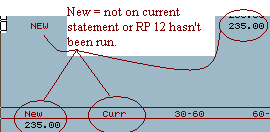
My aging is wrong everything shows new

Cause

  • RP 12 (Update Aging) was not run at the end of statements. This means that no aging was rolled.

Resolution

  • Verify the aging of a current account (RI 1) and see if the charges are all displayed as new or current.

    If aging has not rolled do the following

  • go to menu RP
  • Select option 12
  • Complete the aging

If the aging on items say current that means the procedure has been run.

  • If more than 1 day has passed since statements you will need to reset your statement date after updating your Aging.
  • Go to ZU (Support Menu)
  • Select option 19 (Administrators Menu)
  • Select option 17 (Set statement date). This will reset the statement date to the date you select.

[back to top]

IBS Lumber and Building Material Software Copyright © 2006 IBS Lumber Software Inc (TM)
Last modified: November 7, 2011

IBS Sales & Support 888-640-1252
Main Office 888-640-1252
Fax IBS 877-712-8937

All pages contained in this support website are not intended for general public distribution. Any material here can be considered private, confidential with various copyrights and restrictions against public release. You 'the browser' cannot legally release this information for general public distribution.

remote support: http://www.gotomeeting.com | remote support download program