IBM Server Site

IBS Home Up

How to adjust onto or remove credits from an account

  • To adjust $$$ onto an account you must use a negative payment.
    Example $50.25- = add $50.25 onto the customer balance
  • To take $$$ off an account you make a regular payment
    Example $50.25 = take $52.25 off the current customer account balance
  • To apply a credit you must post the negative amount of the credit beside the credit amount and the positive amount beside the charge(s) you want it distributed to. See image below.

Important

  • Use the payment code 'P' when you are receiving money or paying money to a customer
    • In this case you are receiving cash or paying out money to a customer.
  • Use the adjustment code 'A' when you are adjusting onto or off an account.
    • In this case no cash is being received from or paid to the customer.

Example 1

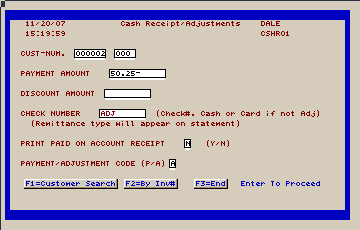
  1. Here we are adding $50.25 onto an account as a charge (usually a returned check or misapplied payment). Key in 50.25- in the payment amount field then change the adjustment code at the bottom to 'A' for adjustment and press ENTER.
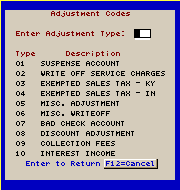
  2. The next screen requests what type of adjustment you are going to make. Please note that adjustment codes vary from business to business. Yours are probably different from the ones displayed below.
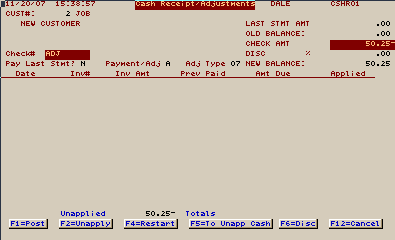
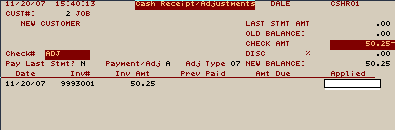
  3. This account has no charges or credits to apply the $50.25 to so we have to do a 'F5 (Apply credit/charge to account). This creates a separate line item on the account.
  4. Once the credit/charge is applied you need to press 'F1' (Post) to finish.

[back to top]

IBS Lumber and Building Material Software Copyright © 2006 IBS Lumber Software Inc (TM)
Last modified: November 7, 2011

IBS Sales & Support 888-640-1252
Main Office 888-640-1252
Fax IBS 877-712-8937

All pages contained in this support website are not intended for general public distribution. Any material here can be considered private, confidential with various copyrights and restrictions against public release. You 'the browser' cannot legally release this information for general public distribution.

remote support: http://www.gotomeeting.com | remote support download program