|

| |
How to Setup Workstation Printers
Additional Printer Information & Issues
Setup Procedure
- Go to MU (Management
Update)
- Select Option 2 (IBS
Configuration)
- F3 six times to go to
page 4
- Press F9 to go to page 5
- Key in the workstation number
(i.e. A1, W1, BA, etc.) you want to configure then press
ENTER
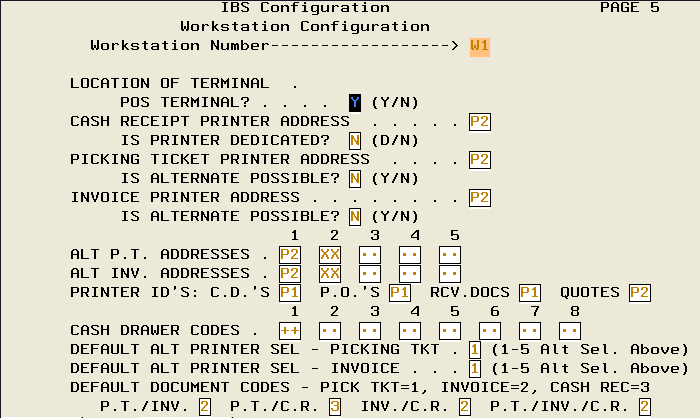
Key Fields
- POS Terminal (Y/N)
Y = Yes, you can do sales, quotes and purchase orders from
this workstation
N = No, you cannot do sales, quotes or purchase orders from this workstation
- Cash Receipt printer
Key in the printer number
- Is the printer dedicated
Y = Yes, this is the ONLY workstation that can use this
printer
N = No, any workstation can use this printer
- Invoice Printer Address
- Is Alternate Possible
- Alternate P/T Ticket Addresses
- Alternate Invoice Addresses
- Printer ID's
CD's - Cash drawer reports printer address
PO's - Purchase orders
Receiving Documents
Quotes
- Default Alternate P/T (Picking Ticket) Number
- Default Alternate Invoice Number
- PT/Inv
- PT/CR
- Inv/CR
- PT/Inv/CR
|
