IBM Server Site

IBS Home Up Adjust charges onto an account

RU 1 - Receipts and Adjustments

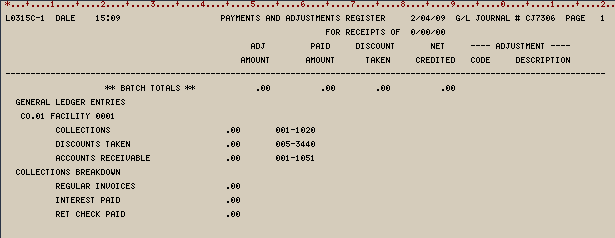
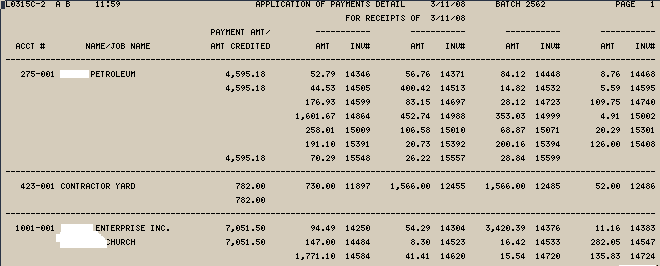
Receipts and adjustments register | Blank example | Actual Examples

Step by Step

Step 1 – RU 1

Step 2 – Show ‘0’ balance accounts

  • This is only necessary if the account in question has no current balance.
  • Change the show 0 balance accounts to ‘Y’ if necessary

Step 3 – Enter search criteria

  • Key in either Alpha or numeric (customer #) search criteria

Step 4 – Key in payment or credit information

  • A negative payment will increase the customer balances and charges due.
  • A positive payment will count against charges on the account and remove or reduce them.

Example 1 – Adding charges to an account

  • This example would add $1010 to the total due balance of the account

Example 2 – Paying or adjusting charges off an account

  • This example would adjust $1010.00 off this account.

Step 4a – If using ‘A’ for adjustment then enter appropriate Adjustment code

Step 5 – Confirm payment amount

Step 6 – Pay the appropriate invoices as necessary

  • Credits must be applied as positive payments against the items
  • Charges must be applied as negative payments
  • Use ‘F5’ to post a single charge or single credit to the account.

Receipts and Adjustments Register

Blank Example

Actual examples

IBS Lumber and Building Material Software Copyright © 2006 IBS Lumber Software Inc (TM)
Last modified: November 7, 2011

IBS Sales & Support 888-640-1252
Main Office 888-640-1252
Fax IBS 877-712-8937

All pages contained in this support website are not intended for general public distribution. Any material here can be considered private, confidential with various copyrights and restrictions against public release. You 'the browser' cannot legally release this information for general public distribution.

remote support: http://www.gotomeeting.com | remote support download program