IBM Server Site

IBS Home Up

Install power supply in iSeries 820 or 5075, 5095, or 0595 expansion unit

Additional Resources

9406-820 power supply

To install the power supply, perform these tasks:

Note:
The figures in these instructions may not look exactly like the server that you have. However, the steps to perform the task are the same.

__ 1. Perform prerequisite tasks as described in Before you begin.
__ 2. Power down the system. For instructions, refer to Power down the system.
__ 3. Remove the back cover. Refer to 820, 5075, and 5095 side and back cover.
__ 4. Remove the left side cover (viewed from back).
__ 5. Locate the power supply area. Refer to Locations.
__ 6. You will install the power supply into the next available area.

820 System Unit:

  • Remove the power supply filler plate from position P03 before installing the power supply. Pull the latch to remove the filler plate.

5075, 5095 or 0595 Expansion Unit:

  • Install the power supply in position P02.
__ 7. Follow the steps in Details: Install power supply in iSeries 820 or 5075, 5095, or 0595 expansion unit to install the new power supply.


Details: Install power supply in iSeries 820 or 5075, 5095, or 0595 expansion unit

To install the power supply, follow these steps:

__ 1. Pull the handle down on the power supply.
Note:
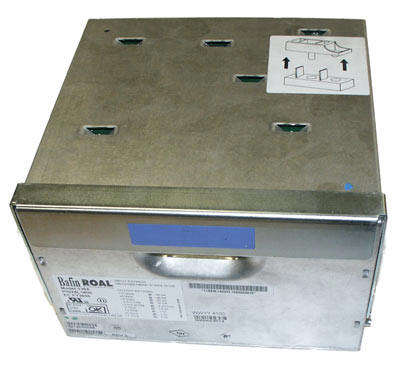
The following figure is a power supply shown on an iSeries model 820. The power supply for the 5075 expansion unit is the same.

Power supply on an iSeries server 820
__ 2. Slide the power supply into the system unit.
__ 3. Move the handle up to lock in place.
__ 4. Look at the back of the system unit. A green light on the power supply indicates that power is powered on.
__ 5. Install side cover.
__ 6. Plug the power cord into the power supply and into the outlet.
__ 7. Install back cover.
__ 8. Power on the system. For instructions, refer to Power on the system.
IBS Lumber and Building Material Software Copyright © 2006 IBS Lumber Software Inc (TM)
Last modified: November 7, 2011

IBS Sales & Support 888-640-1252
Main Office 888-640-1252
Fax IBS 877-712-8937

All pages contained in this support website are not intended for general public distribution. Any material here can be considered private, confidential with various copyrights and restrictions against public release. You 'the browser' cannot legally release this information for general public distribution.

remote support: http://www.gotomeeting.com | remote support download program