IBM Server Site

IBS Home Up 2677M Diagrams 2677M Setup

IO 2677M

Documentation

Cursor Toggle

  • Alt-Alt-Reset > this changes from underline to block cursor type
  • Alt-Alt-X > this changes cursor from blink to not blink
  • See 2677 setup for additional keyboard sequence setups

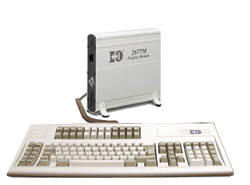
Base Unit

  • Logic Unit
  • 122-key PS/2 keyboard
  • Power Supply
  • 2 Year Warranty
  • MONITOR SOLD SEPARATELY

2677M Example (Front View)

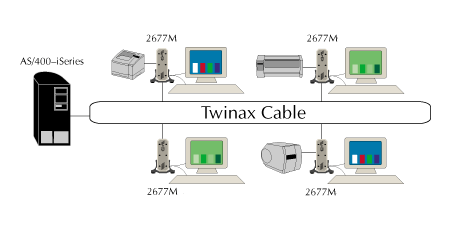
Sample Network Setting

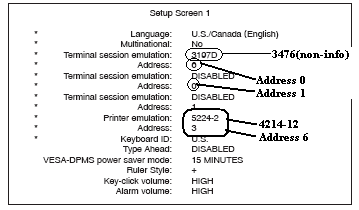
Setup Options

Setup Overview

  1. Find open ports. If you don't know which ports are available
    Print the device addresses.
    MR 19, 8 CTL01 or PRTDEVADR CTL01 (If your location has more than one controller the controller number may be different.)
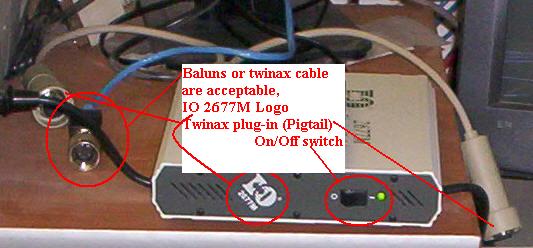
  2. Connect twinax terminal to power, monitor, keyboard and twinax line
  3. Power on terminal holding down space bar
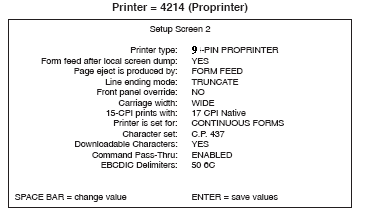
  4. Configure the terminal setup
  5. Press ENTER to save changes restart terminal
    • Cursor in upper right = cable problem
      Check the cables
    • Cursor in upper left = cable good check ports
      WRKCFGSTS *DEV
    • Cursor bounces between both left and right = conflict with another workstation on the same line
      Check the Device Address Report (PRTDEVADR CTL01 or MR 19, 8 CTL01)
  6. Verify that all screens (if more than one are configured are working)
    Alt-Jump = change screen
  7. Verify that printer is working if one is physically attached
    You will need to answer messages
  8. Configure new terminal setup for printing (MU 2, Page 5)
  9. Get a cup of coffee your finished

Terminal Setup

  • Unit is capable of 3 displays and 1 printer
  • Most common setup is 2 displays and 0-1 printers

IBS Lumber and Building Material Software Copyright © 2006 IBS Lumber Software Inc (TM)
Last modified: November 7, 2011

IBS Sales & Support 888-640-1252
Main Office 888-640-1252
Fax IBS 877-712-8937

All pages contained in this support website are not intended for general public distribution. Any material here can be considered private, confidential with various copyrights and restrictions against public release. You 'the browser' cannot legally release this information for general public distribution.

remote support: http://www.gotomeeting.com | remote support download program