|

     
| |
V3, V4 General Ledger
*IMPORTANT:
You are using version 3 or 4 if your system was installed on or after 2005.
G/L V3 and V4 Notes |
What Feeds the G/L? |
Graphical Process Path for G/L
Path leading to G/L
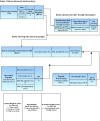
Path Described

Process Path Display (Example 1) Going to the G/L

Types of Transactions

Points to remember General
Ledger Version III
All IBS locations
installed since late 2005
- If it hasn't
passed through the Invoice Register (MP 1, 5) it has not been
posted to your General Ledger.
- Review the ARTR
(Accounting Transaction File) regularly for any General
Ledger entries (MP 2, 7-8). These items are NOT in your general
ledger even though they ARE on your invoice register.
There
are 2 reasons for a transaction
not to post
directly from the invoice register
to the General Ledger
1.) it is out of balance
or
2.) it has an invalid account number
Points to remember General
Ledger Versions I & II
All IBS locations
installed 2005 and before
- If it hasn't
passed through the Invoice Register (MP 1, 5) it has not been prepped
for posting (GL Versions I & II)
- Review the ARTR
(Accounting Transaction File) for post pending transactions. General
Ledger entries (MP 2, 7-8). These items are NOT in your general
ledger even though they ARE on your invoice register.
- General Ledger
Versions I & II also require you to post via (MP 2, 9) each time you want to
send the data over to the General Ledger+
Sales
- Delivery tickets
- do not affect your General Ledger numbers
- Cash Sales
- do not affect General Ledger numbers until processed
through both pre-invoice margin (MP 1, 4) report AND invoice register
(MP 1, 5)
- Credits
- do not affect General Ledger numbers until processed
through both pre-invoice margin (MP 1, 4) report AND invoice register
(MP 1, 5)
- Invoices (Charge Sales)
- do not affect General Ledger numbers until processed
through both pre-invoice margin (MP 1, 4) report AND invoice register
(MP 1, 5)
Inventory
- Received inventory
- IBS GL Version 3 - does not affect General Ledger
numbers until processed through the invoice register (MP 1, 5)
- IBS GL Software versions I & II - does not affect
General Ledger numbers until processed through the invoice register (MP
1, 5) and the ARTR File posting (MP 2, 9)
- Sold inventory
- IBS GL Version 3 - does not affect General Ledger
numbers until processed through the invoice register (MP 1, 5)
- IBS GL Software versions I & II - does not affect
General Ledger numbers until processed through the invoice register (MP
1, 5) and the ARTR File posting (MP 2, 9)
- Transferred inventory
- IBS GL Version 3 - does not affect General Ledger
numbers until processed through the invoice register (MP 1, 5)
- IBS GL Software versions I & II - does not affect
General Ledger numbers until processed through the invoice register (MP
1, 5) and the ARTR File posting (MP 2, 9)
Receivables
- Adjustments
- IBS GL Version 3 - does not affect General Ledger
numbers until processed through the invoice register (MP 1, 5)
- IBS GL Software versions I & II - does not affect
General Ledger numbers until processed through the invoice register (MP
1, 5) and the ARTR File posting (MP 2, 9)
- Paid on Account
- IBS GL Version 3 - does not affect General Ledger
numbers until processed through the invoice register (MP 1, 5)
- IBS GL Software versions I & II - does not affect
General Ledger numbers until processed through the invoice register (MP
1, 5) and the ARTR File posting (MP 2, 9)
Menu Options
- General Leger Main MENU - GU
Select this option to
access all General Ledger MENUs
- General Ledger Reports - GR
Select this option to
print G/L reports
- General Ledger Inquiry - GI
Select this option to
Inquiry on G/L accounts
- General Ledger Transactions - GU, 3
Select this option to
process journal entries
- Period Processing MENU - GU, 4
Select this option to
close periods or complete year ending process
- File Maintenance - GU, 5
Select this option to
manage your G/L Chart of Accounts and format member
- General Ledger Control - GU, 6
Select this option
for general file maintenance
- General Ledger Documentation - GU, 22
Select this option to
view online documentation
- General Ledger Initial Setup and Configuration - GU, 23
Select this option to manage your initial setup options
|



