|

   
| |
4 Places to remember for discount percentages
- MU 1 Screen 3
- all master (global) discount percentages are assigned
here
- you set discount codes 1-9 here
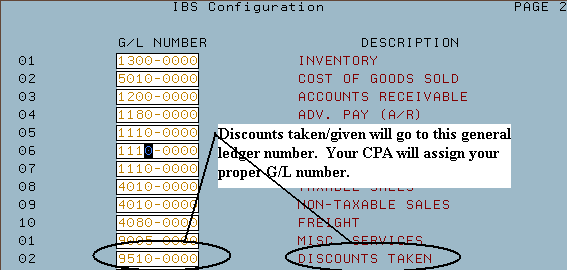
- MU 2 Page 2 - you set your general ledger number for discounts taken
here
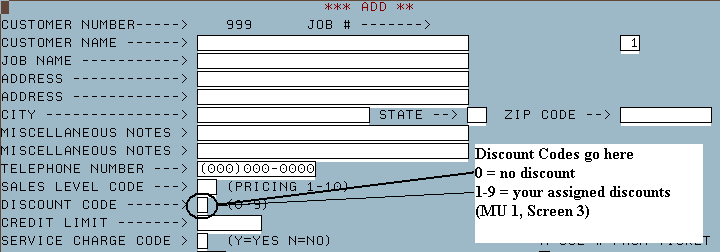
- RU 3 Screen 1 - all customer (job) specific discount percentages are
assigned here
- you set your customer discount level (0-9) here
- IU 4 Screen 1 - all items flagged to never give a discount are set here.
- you flag individual items to not give discounters here
- 0 = no discount
- 1-9 = the discount % that you set up in MU 1, Screen 3
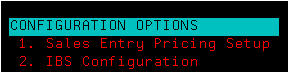
- MU 1 (Sales Entry Pricing Setup)
- Screen 3
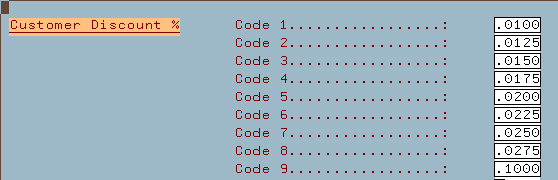
- In this example customers with discount codes of 1 receive a .01 (or
1%) prompt pay discount. Customers with a 2 code receive a .0125
(or 1.25%) discount and so on...
- Once you have assigned your master discount levels you should finish by
setting up your customer.
- MU 2 (IBS Configuration)
- Page 2 GL Numbers
- RU 3 (Customer Master)
- Screen 1
You can flag an inventory item to never give a discount.
- Some do not
discount examples include: delivery charges, fuel, labor, power tools,
close margin items, items previously discounted, etc.
- Go to IU 4 (Master Inventory Update)
- Enter your sku number
- On the first screen look for the discount field
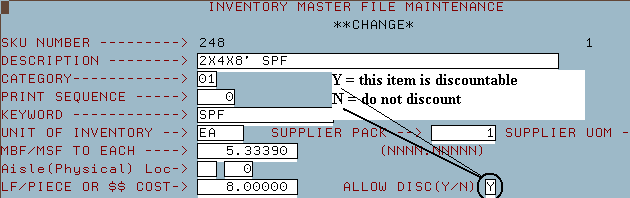
- Change allow discount from 'Y' (discountable) to 'N' (no discount given)
|

