IBM Server Site

IBS Home Up

Using Supplier Packs for Ordering

*IMPORTANT

  • The key pitfall to using supplier packs is when not everyone knows what a supplier pack does. If a person isn't watching they will order the sell quantity not the supplier quantity.
  • EVERY TIME you receive a product it WILL be multiplied into inventory by the supplier pack quantity!
  • Understanding the math

    INVENTORY RECEIVED * SUPPLIER PACK = TOTAL UNITS RECEIVED INTO INVENTORY
    • Example 1 - 10 caulk boxes received via PO * supplier pack set at 24 = 240 caulk skus received.
    • Example 2 - 1 caulk box received into inventory * supplier pack set at 24 = 24 caulk skus available for sale

Purpose

  • Setting a supplier pack quantity will immediately multiply your received quantity by the set amount.
  • You may only set the supplier pack quantity by going to IU #4.

Examples

  • Setting the supplier pack to 24 means that every time you receive via inventory receiving or purchasing 1 unit (i.e. box) you receive into inventory 24 units.
  • I order 1 box and get 24 units of my product.

INVENTORY RECEIVED * SUPPLIER PACK = TOTAL UNITS RECEIVED INTO INVENTORY

  • Example 1 - 10 caulk boxes received via PO * supplier pack set at 24 = 240 caulk skus received.
  • Example 2 - 1 caulk box received into inventory * supplier pack set at 24 = 24 caulk skus available for sale

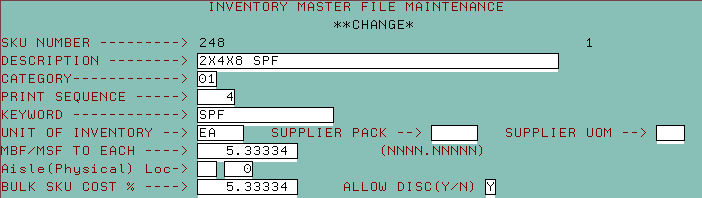
Screen 1

  • Go to IU 4 (Inventory master)
  • Tab down to supplier pack and supplier unit of measure (UOM)
  • Key in the new values and press ENTER to update
  • All future purchases or receipts of this inventory product will be multiplied by this value
    INVENTORY RECEIVED * SUPPLIER PACK = TOTAL UNITS RECEIVED INTO INVENTORY

IBS Lumber and Building Material Software Copyright © 2006 IBS Lumber Software Inc (TM)
Last modified: November 7, 2011

IBS Sales & Support 888-640-1252
Main Office 888-640-1252
Fax IBS 877-712-8937

All pages contained in this support website are not intended for general public distribution. Any material here can be considered private, confidential with various copyrights and restrictions against public release. You 'the browser' cannot legally release this information for general public distribution.

remote support: http://www.gotomeeting.com | remote support download program