|

    
| |
Quick Setup Instructions
*IMPORTANT
Problems Scanning
There is a periodic problem with the newer barcode scanners scanning too fast
for dusty or worn labels. If the scanner requires multiple passes for
scanning try the following:
- Check the distance that you are scanning.
The newer scanners shoot from a longer distance, generally 12-24 inches
while the older ones scan from 6-18 inches.
- Slow the scan rate down
- Go to page 4-9 in the code
book.
- Scan inter-character delay
code, and
- go to the back cover then
- scan
0,5,and
save.
- Axel | Alt-ctl-esc
- Bosanova | Alt-ctl-end
- I-O 2677M | Power off then power on with spacebar held down
- IBM 3488 | Power off then power on with spacebar held down
- Priam 5488 | Power off then power on with spacebar held down then
press then setup key
[back to top]
- scan USB keyboard interface (p. 1-10)
- scan add prefix
- scan 9, 9
- scan 3, 1
- scan 0, 9
- scan save
- scan add suffix
- scan 9, 9
- scan 0, D (if the PC enter is ENTER) or scan 0, 1 (if the Right
control is ENTER)
- scan save
- scan usb interface (Interface scancodes)
- power off/on unit
- test unit in sales entry
[back to top]
- scan PS/2 interface (p. 1-6)
- scan add prefix
- scan 9, 9
- scan 3, 1
- scan 0, 9
- scan save
- scan add suffix
- scan 9, 9
- scan 0, D (if the PC enter is ENTER) or scan 0, 1 (if the Right
control is ENTER)
- scan save
- scan ps/2 interface (Interface scancodes)
- power off/on unit
- test unit in sales entry
[back to top]
- Reset workstation configuration the numeric keypad must be set to ENTER
Alt-Ctl-Esc to enter setup
- Terminal -->
- Sessions 1-4 (Each must be configured
individually) -->
- Session Profile -->
- User Defined Keys -->
- set numpad to ENTER -->
- VALID to exit.
- scan PS/2 interface (p. 1-6)
- scan add prefix
- scan 9, 9
- scan 3, 1
- scan 0, 9
- scan save
- scan add suffix
- scan 9, 9
- scan 0, D (if the PC enter is ENTER) or scan 0, 1 (if the Right
control is ENTER)
- scan save
- power off/on unit
- test unit in sales entry
[back to top]
- scan terminal type (p.2-2)
- scan 0,0,8
- scan save
- power off then on unit
- scan add prefix
- scan 9, 9
- scan 3, 1
- scan 0, 9
- scan save
- scan add suffix
- scan 9, 9
- scan 0, 1
- scan save
- power off/on unit
- test unit in sales entry
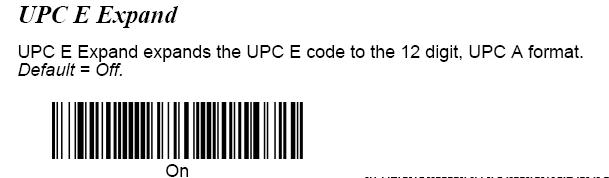
UPC E Expand On (p. 7-24, p.92)
[back to top]
- scan add prefix

- scan 9, 9
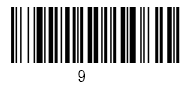
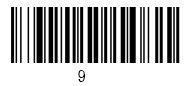
scan 3, 1
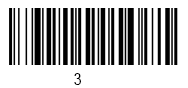

8. scan 0, 9

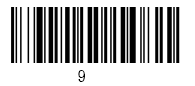
9. scan save


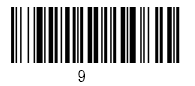
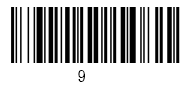
- scan 0, D (if using PC Enter as ENTER)

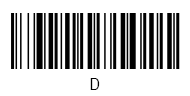
- scan 0, 1 (if using right Control as ENTER)
- scan save

UPC E Expand On (p. 7-24, p.92)
[back to top]
USB Interface

AT/PS2 Keyboard Wedge

[back to top]







[back to top]
|

