IBM Server Site

IBS Home Up

Printer Configuration Screen

Printer Setup

  • Alt-Ctl-Esc
  • Configuration
  • Ports/Auxiliary Ports
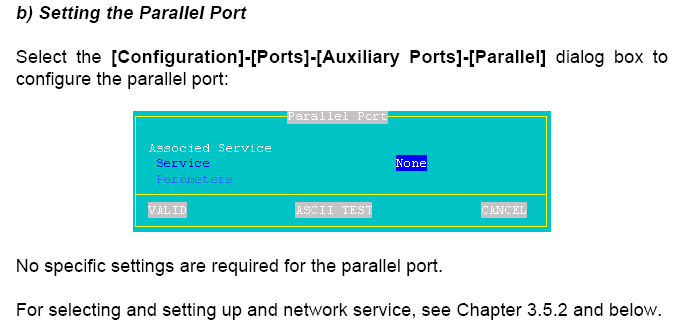
  • Parallel Port
  • Associated Service >> prt5250
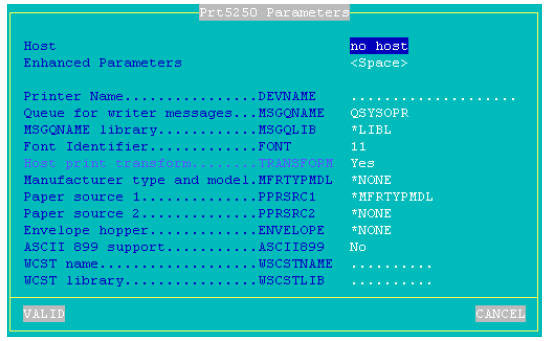
    • Enhanced parameters >> <space> (See below for settings)
    • Printer Name >> P3 [put in the correct printer port]
    • Message Queue >> QSYSOPR
    • Msgqlib >> *LIBL
    • Font id >> 11
    • Host Print Transform >> Yes
    • Mfg type and model >> none >> *IBM42011
    • Paper source >> none >> *MFRTYPMDL
      • letter/legal/executive/leger/a3/a4/a5/b4/b5/cont 80/cont 132/none
    • Paper source 2 >> none
    • Envelope hopper >> none
    • ASCII 899 Support >> No
    • WCSTname >> blank
    • WCSTlibrary >> blank
    • VALID

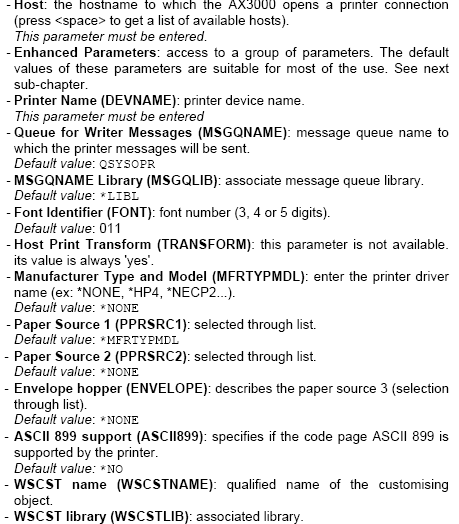
    See Printer Setting Descriptions for detailed explanations

    Enhanced Parameters

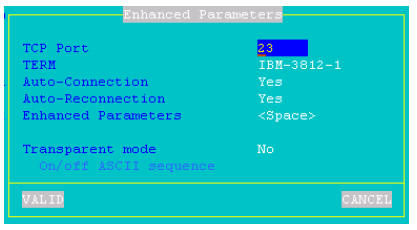
  • TCP Port >> 23
  • Term >> IBM-3812-1
  • Auto-Connection >> Yes
  • Auto-Reconnection >> Yes
  • VALID
  • back to 5250 Printer Setups

Printer Setting Descriptions

Additional Information

IBS Lumber and Building Material Software Copyright © 2006 IBS Lumber Software Inc (TM)
Last modified: November 7, 2011

IBS Sales & Support 888-640-1252
Main Office 888-640-1252
Fax IBS 877-712-8937

All pages contained in this support website are not intended for general public distribution. Any material here can be considered private, confidential with various copyrights and restrictions against public release. You 'the browser' cannot legally release this information for general public distribution.

remote support: http://www.gotomeeting.com | remote support download program