|

 
| |
Load Balancing on 8361 Networks
Load Balancing Example
Figure 7 shows how multiple servers can reduce network
congestion when a large number of Network Stations power on simultaneously. The
administrator installs the IBM Network Station Manager program on multiple
servers that act as base code servers. This distributes copies of the large
executable files (operating system and applications) across servers. You can use
DHCP to configure groups of Network Stations to access different base code
servers.
Note: There is no way to separate
the base code server from the terminal configuration server when using BOOTP.
You can only do this by using DHCP.
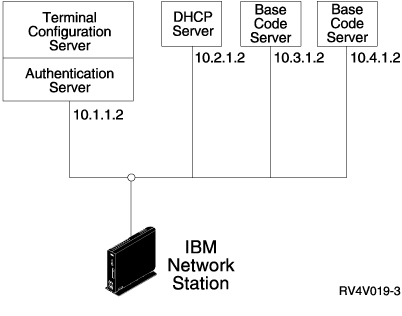
Figure 7. Load Balancing Example
This example uses four systems to divide up the work load:
- Two SCO UNIX systems are performing the role of base code
servers (host 10.3.1.2, the base code server that we use in our example, and
host 10.4.1.2). This example uses two base code servers to divide the work
load. Any number of base code servers is possible.
- An IBM RS/6000 system is performing the role of a DHCP
server (host 10.2.1.2). You do not need to install the IBM Network Station
Manager program on this system.
- An IBM AS/400 system is performing the role of terminal
configuration and authentication server (host 10.1.1.2). We use the IBM
Network Station Manager program that is installed on the terminal
configuration and authentication server to centrally manage all user
configurations and terminal configurations. One IBM Network Station Manager
program should manage all IBM Network Stations to prevent conflicts.
A user would see a log-on dialog from the base code server and
do the following:
- Click the Roam button.
- Enter the address of the authentication server
(10.1.1.2).
Tip: If you want to use DHCP, you
should use the IBM Network Station Manager program to check that DHCP is
configuring DNS. Ensure that you have selected DNS Configuration
from BOOTP or DHCP server. To find this
setting, click Hardware, click Workstations, and then select
System Defaults.
For this configuration to work, you must configure the items
in Table 7 in the DHCP server settings.
Table 7. DHCP Options for Load Balancing
| Description |
Example |
| Option 66 or bootstrap
server - base code server IP address |
10.3.1.2 |
| Option 67 - bootfile path |
/netstation/prodbase/kernel |
| Option 211 - protocol to use for the base
code server. Possible values are tftp, nfs or rfs/400. |
nfs |
| Option 212 - terminal configuration
server IP address. Up to two addresses separated by a blank can be
specified. |
10.1.1.2 |
| Option 213 - Configuration files path
name for option 212. Up to two paths separated by a blank can be
specified. |
/QIBM/ProdData/NetworkStation/configs/ |
| Option 214 - Protocol to use for option
212. Possible values are tftp, nfs, or rfs/400. Up to two values
separated by a blank can be specified. |
rfs/400 |
Notes:
- Options 211, 212, 213, and 214 are site specific
options in DHCP. If you are already using these options for another
purpose, you will need to configure DHCP to avoid conflicts. See
"Configuring DHCP to Avoid Conflicts".
- When two configuration servers are specified, the
first server is tried. If that fails, then the second server is
tried. If the second server is successful, then the second value in
options 213 and 214 are used.
- The IBM Network Stations must be using boot
monitor version 3.0.0 or later. See
"Viewing the Boot PROM Version of an IBM Network Station" for
information on how to view the boot monitor version.
|
Refer to
"Configuring DHCP" for instructions on how to configure DHCP for load
balancing.
Configuring DHCP to Avoid Conflicts
The DHCP options in Table 7 have the flexibility to apply on a
network, subnet, class, or client basis. If you find that options 211-214 are
already in use for other purposes, you can separate these options by subnet or
class. Use Table 8 to determine the Network Station classes.
Determining DHCP Classes
Table 8 lists the DHCP classes assigned to each IBM Network
Station type and model.
Table 8. IBM Network Station DHCP Classes
| Type-Model |
Class |
| 8361-100 |
IBMNSM 2.0.0 |
| 8361-110 |
IBMNSM 2.1.0 |
| 8361-200 |
IBMNSM 1.0.0 |
| 8361-210 |
IBMNSM 1.1.0 |
| 8361-341 |
IBMNSM 3.4.1 |
| 8362-A22 |
IBMNSM A.2.0 |
| 8362-A23 |
IBMNSM A.2.0 |
| 8362-A52 |
IBMNSM A.5.0 |
| 8362-A53 |
IBMNSM A.5.0 |
If you cannot find the type and model
number of your Network Station listed in the table, then do the
following:
- Power on the Network Station.
- As soon as the Network Station begins to search
for its host server (message NS0500), press the Escape key.
- Press the F2 key to view the hardware
configuration. The class number is in the DHCP field.
|
|

