|

  
| |
II 4 - Inventory Audit History
Screen 1 - Sku Selection screen
- Enter your search then type 'S' (Select) to display detail

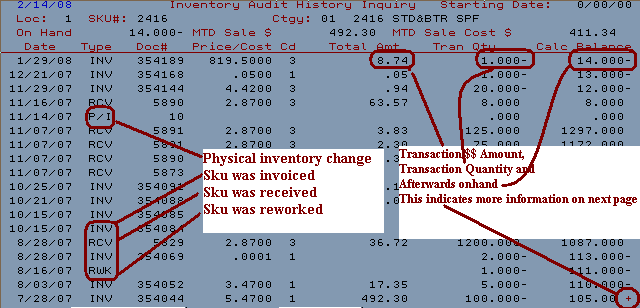
Screen 2 - Sku history details
- date - date transaction occurred
- type - type of transaction
- BEG - Beginning balance
- INV - invoice
- P/I - Physical Inventory
- MNT - General sku maintenance occured
- RCV - Sku is received
- RWK - Rework (i.e. sku is changed into a different
sku)
- Document - type of invoice, PO, receiving report or other document that
occurred with this transaction
- MTD Sale $ Price/Cost - Sales for Month-to-date
- price code is as follows
- 1 = each
- 2 = per 100
- 3 = per 1000 MBF
- 4 = per 1000 MSF
- 5 = linear
- Total Amount - total amount of this transaction
- Tran Quantity - total quantity of this transaction
- Calc Balance - new on-hand balance after transaction
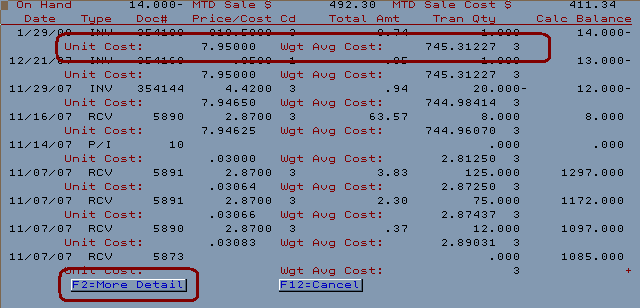
- F2 - more detail will display additional cost information
Screen 3 - F2 More detail
- Unit cost - displays the sold unit cost
- Weighted Average Cost - displays the weighted average cost of the
transaction
Error Messages
If the error message 'no records found' appears, this indicates one of 2
conditions.

- The sku has never had any activity
- The sku is tagged to NOT be audited in the inventory file
IU
4 Bottom left of screen 1 is an option to audit yes or no. Skus are
only audited if they have a '1' (Yes) in this field.

|


