|

 
| |
FS 900 Phone System
Phone Number Replacement Sheet
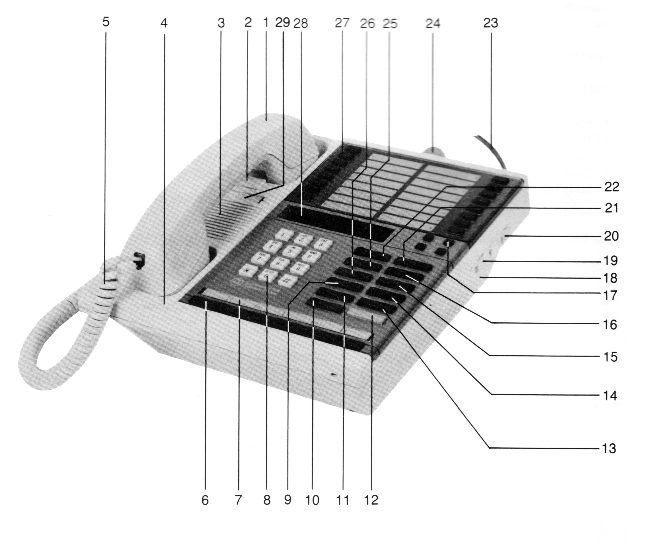
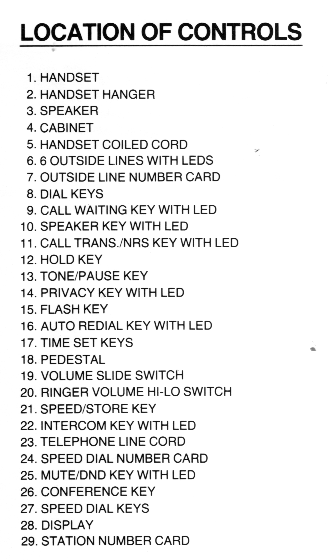
How to Use the Intercom Feature
To Make an Intercom Call
- Press INTERCOM or SPEAKER key. The INTERCOM LED will flash SLOW.
The SPEAKER LED will be steady ON. The display will be blank. You
will hear dial tone.
- Dial the station number (from 20 to 35) or press the SPEED DIAL key for
the station you are calling.
- Lift the handset or press the SPEAKER key and converse.
- If the called station is busy after dialing is complete, you will hear a
busy tone. Display will add "BUSY" to the number dialed.
To Answer an Intercom Call
- When the INTERCOM LED shows a RAPID flash, display will show "CALL" and
the station number calling you, and you hear a ring signal, lift the heandset
or press the SPEAKER key and converse.
- The INTERCOM LED will show a SLOW flash.
To Terminate an Intercom Call
- Press the SPEAKER key, or hang up the handset.
The LED will be OFF and the display will show the time of the Optional
Cartridge is used.
Conference (Three Party Conversion)
- Press the INTERCOM key. You will hear dial tone.
- Contact one party on INTERCOM. The display will show the station
number you are calling.
- Press CONFERENCE key.
- Contact the second party on INTERCOM. The display will show the
station number you are calling.
- Press CONFERENCE key.
Speed Dial
Station Programming
- Press an unlit OUTSIDE line key (Green LED will show an INTERMITTENT
flash, SPEAKER LED is ON steady. The display will show the line number
in use.)
- Press the SPEED DIAL key where the number is stored. The display
will show the line number in use and the telephone number you are calling.
- Either lift the handset or press the SPEAKER key and converse.
System Programming
- Press an unlit OUTSIDE line key. (Green LED will show an
INTERMITTENT flash, SPEAKER LED will be ON steady.)
- Press the SPEED/STORE key.
- Dial the two digit SPEED DIAL number (10-49) representing the OUTSIDE
telephone number you want. The display will show L- and the line
number, SPEED DIAL number and the telephone number you are calling.
- Either lift the handset or press the SPEAKER key and converse.
To Store a Phone Number Using a Pause
- Press SPEED/STORE key. Display will show "S DIAL"
- Press the SPEED DIAL key (1 thru 16) or 2-digit code for System Speed
Dial number
- Dial the pager number before the PAUSE
- Press PAUSE. This inserts a tone detection pause.
- Dial the IBS access code
- Press SPEED/STORE key.
Station Number ID
- Press * key.
- Press 4 on the DIAL key pad. The display shows the station number
after a few seconds.
- Press * again.
Repair Service
Southwestern Bell Telecommunications, INC.
Freedom Phone Division
7442 Shadeland Station Way
Indianapolis, IN 46256-3925
|

