|

 
| |
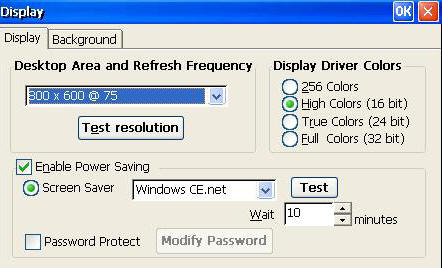
Display
• Desktop Area and Refresh Frequency. Use the scroll list to select the terminal
display resolution. The terminal will support resolutions and frequencies from
600x480x60 up to1280x1024x60 if the monitor will support them. A change here
will result in a terminal reboot when you exit the dialog box. NOTE: Be sure to
test your new setting if you are going up in frequency or resolution. If you do
not test, you could be faced with an unreadable screen after boot-up.
• Test Resolution. Use this button to preview the resolution and frequency
selected on the scroll list. Testing is recommended before locking in this
setting; if the monitor will not support your selection, you will be faced with
an unreadable screen after boot-up. See Troubleshooting Your Terminal if this
situation occurs.
• Enable Power Saving. Check here to enable the screen saver. By default this
function is activated.
• Screen Saver. Click on this radio button to use a screen saver. Then choose,
from the drop-down list, either a floating logo screen saver or a blank screen.
Use the Test button to preview your choice for three seconds.
• Wait. Adjust the amount of idle time before either the Screen Saver or Turn
Off Monitor is activated.
• Password Protect. Check this box if you wish to require a password to escape
screen saver. Then specify your password after clicking on Modify Password.
• Display Driver Colors. This is the terminal hardware video color setting. By
default, High Colors (16 bit) is activated. Higher color resolutions are only
useful if you are using ICA connections and if your Citrix server supports them.
If you encounter any display problem in your RDP or ICA connection applications,
try a lower setting. Note: If the setting is 256 Colors, the RDP Colors in
Control Panel>RDP Settings will automatically revert to 256 Colors, and the
Thousands and Millions options will be absent in Control Panel>ICA
Settings>Preferences. |

