|

   
| |
Running the report from 2008 IBS Management Screens
Running the report from the 2007 or earlier IBS Management Screens
- Go to MP
- Select option 1 (End of Day menu)
- Select option 1 (Cash drawer report)
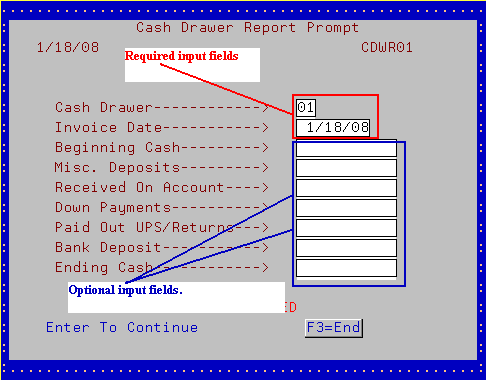
- The cash
drawer report select screen will then prompt
- Key in the information then press ENTER to run the report
Running the report from sales screens
- Go to SR (Sales Reports)
- Select option 1 (Cash drawer report)
- The cash
drawer report select screen will then prompt
- Key in the information then press ENTER to run the report
Required Fields
- Cash Drawer - type in the cash drawer number
- Invoice date - type in the date for the cash drawer you want to run
Optional Fields
- Beginning cash - the cash in till prior to any sales activity.
- Miscellaneous deposits - off the book deposits (cash from vending
machines, other misc. cash found in store).
- Received on account - all cash, checks & charges run through SU 1, F10
is already on the report. You DO NOT have to add the recorded
deposits.
- Down Payments - list any down payments received
- Paid out UPS/Returns - list any IOUs, postage, or other payments taken
from the till
- Bank deposit - list any cash drops to safe or $$$ taken out of the till
for early deposit
- Ending cash - type the final ending cash balance
[back to top]
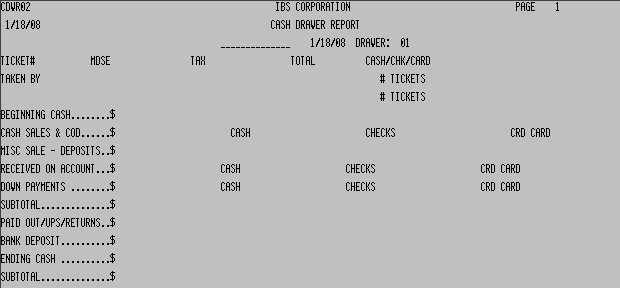
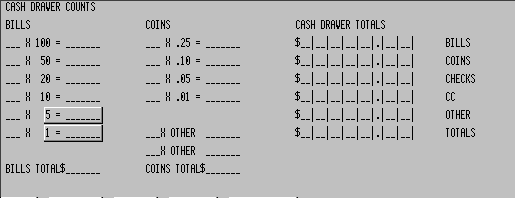
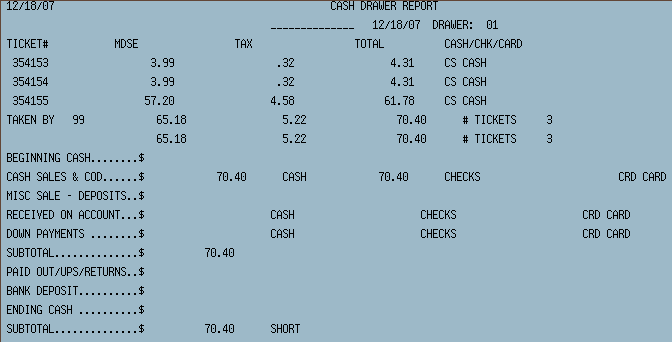
- The following addition appears at the bottom of the cash drawer report
[back to top]
[back to top]
|

