IBM Server Site

IBS Home Up

290, 292, 293 Microline Okidata Printer

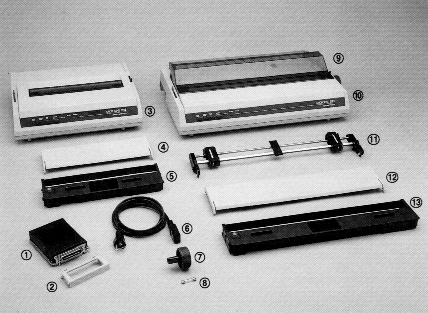
Product Parts

  1. Peronality module
  2. Locking cover
  3. Microline printer
  4. Paper separator
  5. Ribbon cartridge
  6. Power cord
  7. Platen knob
  8. Spare fuse
  9. Acoustic cover (ML 292 and 293 only)
  10. Microline printer (ML 292 and 293 only)
  11. Tractor unit
  12. Paper separator
  13. Ribbon cartridge

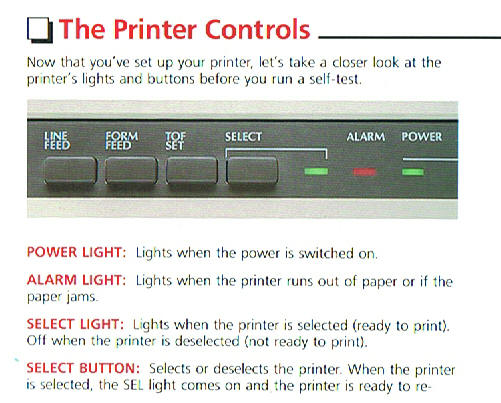
Printer Controls

[back to top]

Running the Self Test Operation

  1. Turn the printer off
  2. Hold down the LINE FEED button and switch the printer ON
  3. After about 3 seconds release the button. A test pattern will print. If it doesn't then your printer requires replacement.
  4. Exit test mode by cycling power to the printer

Cleaning

  • Every three months take a clean, dry, soft cloth and dust around the carriage shaft and platen area. You may afterwards use a can of compressed air to blast away any additional dust or particles.

Fuse Replacement

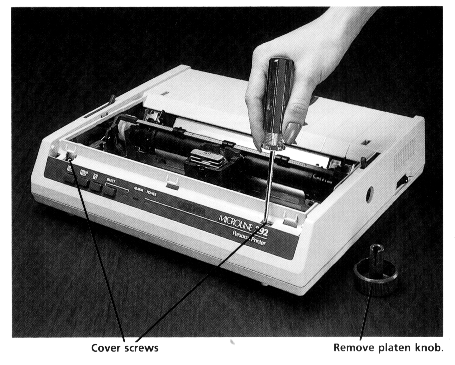
  • Remove the cover by taking out the two screws in the front of the printer and the platen knob.
  • Lift up and remove cover
  • Replace fuse (it is located beside the power button.

[back to top]

IBS Lumber and Building Material Software Copyright © 2006 IBS Lumber Software Inc (TM)
Last modified: November 7, 2011

IBS Sales & Support 888-640-1252
Main Office 888-640-1252
Fax IBS 877-712-8937

All pages contained in this support website are not intended for general public distribution. Any material here can be considered private, confidential with various copyrights and restrictions against public release. You 'the browser' cannot legally release this information for general public distribution.

remote support: http://www.gotomeeting.com | remote support download program