IBM Server Site

IBS Home Up

Initial Printer Setups

  • MACRO 1 = Invoices
  • MACRO 2 = Statements
  • MACRO 3 = Reports
  • MACRO 4 = not used

Access Setup Options

  1. Load continuous form type paper
  2. Pull right hand (continuous form) lever down
  3. Open Control panel
  4. Press SETUP (to enter setup options)
  5. Press Line Feed (Print All)

    Click here for an image of a printer with factory default settings (i.e. one that is not configured).

Program Printer Setups

  1. Macro Options
    • Default Macro should be set as follows:

      Macro 1 for invoice printers,
      Macro 2 statement printers or
      Macro 3 report printers
      Macro 4 used only for 2381, 2481 (wide carriage printers)

  2. Character Options
    • Default Pitch

      Macro 1 = 17
      Macro 2 = 10
      Macro 3 = 17 (2480 Model) or 10 (2481 Model)
      Macro 4 = not used

    • Pitch Lock = Yes on all macros 1-3
  3. Paper Handling Options
    • Auto Tear Off = No for macros 1,3, 4
      • Off for invoices
      • On for reports
    • Form length

      Macro 1 = 42
      Macro 2 = 42
      Macro 3 = 66
      Macro 4 = 66

  4. Data Options
    • Buffer = minimum

[back to top]

Saving Configuration

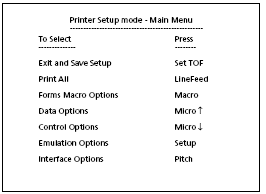
  1. From the Main Setup Menu press Set TOF (Top of Form). The system will then save the settings.
  2. Close front control panel flap
  3. if Ready light is on and solid you can start printing, if not press Start/Stop

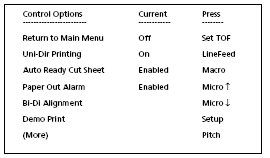
Printer Configuration

Printer Setup Main Menu

[back to top]

IBS Lumber and Building Material Software Copyright © 2006 IBS Lumber Software Inc (TM)
Last modified: November 7, 2011

IBS Sales & Support 888-640-1252
Main Office 888-640-1252
Fax IBS 877-712-8937

All pages contained in this support website are not intended for general public distribution. Any material here can be considered private, confidential with various copyrights and restrictions against public release. You 'the browser' cannot legally release this information for general public distribution.

remote support: http://www.gotomeeting.com | remote support download program